How to Write an Invoice (Step by Step + Free Template)
By FreeBillKit Team · June 10, 2026 · Updated August 12, 2026
To write an invoice, add your business and client details, a unique invoice number, the issue and due dates, an itemised list of what you supplied with quantities and rates, the subtotal, tax and total, and how to pay. Save it as a PDF and send it. That’s the whole job. The rest is doing it cleanly so you get paid on time.
A messy invoice is one of the quietest reasons small businesses get paid late. A wrong client name, no due date, a number the client can’t reference. Each one gives someone a reason to set it aside. Here’s exactly what goes on a professional invoice, and how to put one together in about a minute.
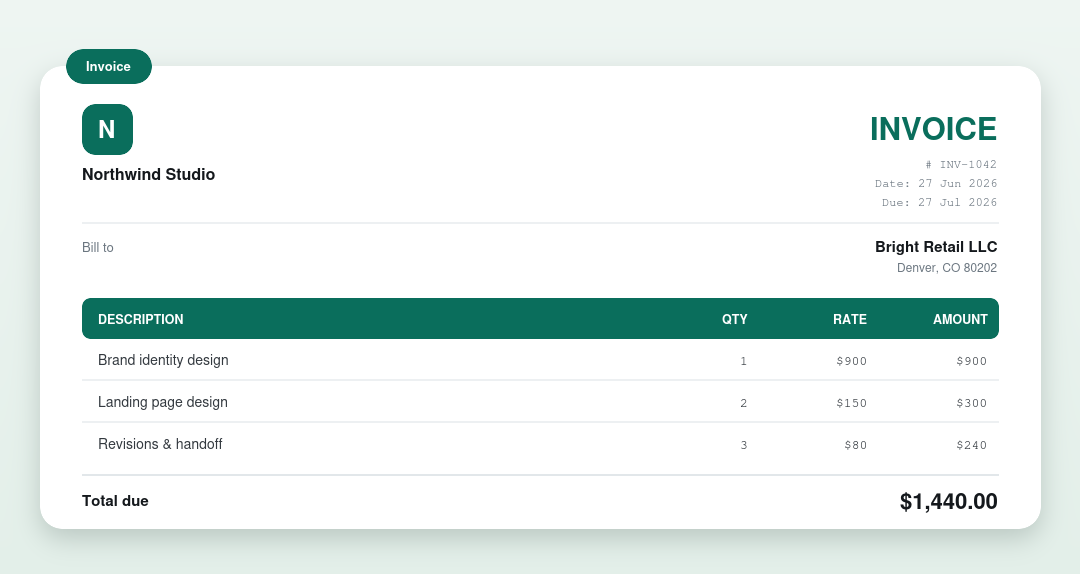
What every invoice must include
At a minimum, a valid invoice needs the seller and buyer details, a unique invoice number, the issue and due dates, an itemised list of what was supplied, and the total due. Missing any of these is the most common reason an invoice gets queried or paid late.
| Section | What to put |
|---|---|
| The word “Invoice” | Plus a unique, sequential number (INV-0001) |
| Business & client | Your name, address and tax number, and the client’s legal name and billing address |
| Dates | The invoice date and a clear payment due date |
| Line items | A description, quantity and unit price for each product or service |
| Totals | Subtotal, any tax or discount, and the grand total due |
| Payment details | Accepted methods and your bank or payment link |
| Notes & terms | Payment terms, any late-payment policy, and a short thank-you |
How to write an invoice in 4 steps
- Add your details and the client’s. Your business name, address and contact at the top, then who the invoice is for. The correct legal name matters in larger companies.
- List each product or service. One line per item with a description, quantity and rate; let the amounts calculate themselves to avoid maths errors.
- Set the number, dates, tax and discount. Give it a unique number, add the issue and due dates, and apply any tax or discount.
- Download as PDF and send. A clean PDF, emailed to the client, with your payment details ready.
How to number your invoices
Use a simple sequential system such as INV-0001, INV-0002, or include the year (2026-001). Never reuse a number and never skip backwards. Consistent numbering keeps your bookkeeping clean and makes any single invoice easy to find later.
Set clear payment terms
State exactly when payment is due, either “due within 14 days” or “due on receipt”, rather than leaving it vague, and back the term with a real date. Not sure which to use? See Net 30 and other payment terms explained.
Common mistakes to avoid
- Forgetting the due date, so the client has no deadline.
- Vague line items the client can dispute.
- The wrong client legal name, which stalls payment in bigger firms.
- No invoice number, making reconciliation hard.
- Maths errors: always let the totals calculate automatically.
Create one in under a minute
Rather than format an invoice by hand, use the free invoice generator: fill in the fields, watch the live preview, and download a clean PDF. Trades billing labour and materials can use the contractor invoice generator, and if you need to price a job first, send a quote. Prefer a file? Grab a free invoice template, or see a finished invoice example.
Frequently asked questions
What are invoices?
Invoices are the documents a seller sends to request payment for goods or services already delivered. Each one records who is billing whom, what was supplied, how much is owed, and when payment is due, so both sides have a matching record of the debt.
What should an invoice include?
Seller and buyer details, a unique invoice number, the invoice and due dates, itemised line items, totals with any tax, and payment details.
How do I number invoices?
Use a simple sequential system such as INV-0001 and never reuse or skip numbers backwards.
When should payment be due?
State a clear term such as “due within 14 days” or “due on receipt” and back it with a real date so the client has a firm deadline.
Do I have to charge tax on an invoice?
Only if you’re registered to collect it. If you are, show the tax rate and amount as a separate line before the total.
What’s the difference between an invoice and a receipt?
An invoice requests payment before it’s paid; a receipt confirms it after. See invoice vs receipt.
Written by the FreeBillKit team. Last reviewed July 2026.