Free Invoice Template for Word
A clean, free invoice template for Microsoft Word. Download the .docx, replace the placeholders with your details, and send. No signup, no watermark, and it opens in Word, Google Docs and LibreOffice.
⇩ Download the Word template (.docx)
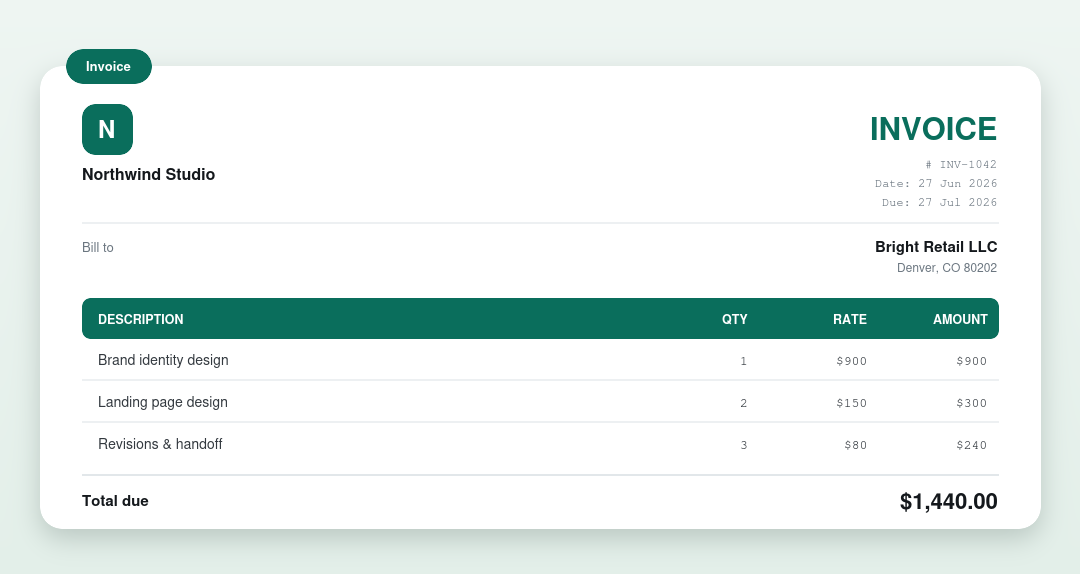
How to use this Word invoice template
- Download and open the .docx in Microsoft Word (or Google Docs / LibreOffice).
- Replace “Your Business Name”, the address and the client details.
- Add a line per item with the quantity and rate, then type the amounts.
- Fill in the subtotal, tax and total.
- Save, or export as PDF, and send it to your client.
Want the totals worked out for you?
A Word document won’t add up the numbers. If you’d rather not do the math, our free invoice generator calculates the totals and downloads a finished PDF in your browser, no Word needed. For a spreadsheet that auto-calculates, use the Excel template.
What’s on the template
Your business details and logo space, the client’s details, an itemised table (description, quantity, rate, amount), and subtotal, tax and total lines, everything a valid invoice needs. New to invoicing? Read how to write an invoice.
Other invoice template formats
- Invoice template – Excel
- Invoice template – PDF
- Invoice template – Google Docs
- Invoice template – Blank
What’s on an invoice
| Part | What it shows |
|---|---|
| Business & client | Who the invoice is from and who’s billed |
| Invoice number & dates | A unique number, the issue date and due date |
| Line items | Each product or service with a quantity and rate |
| Totals | Subtotal, any tax or discount, and the total due |
| Payment details | Accepted methods and where to pay |
Frequently asked questions
Is the Word invoice template free?
Yes. It’s completely free, with no signup and no watermark. Download it and use it as many times as you like.
Can I edit it in Google Docs?
Yes. Upload the .docx to Google Drive and open it with Google Docs, or use our dedicated Google Docs invoice template page for step-by-step instructions.
Does the Word template calculate totals?
No. Word doesn’t do calculations. Type the totals yourself, use the Excel template for automatic math, or use our invoice generator.
How to Customize the Template in Word
Download the .docx file using the button above. It opens in Word 2016 or later, Google Docs, and LibreOffice.
Replace the logo. Click the placeholder image in the header and swap in your own. A PNG with transparent background looks cleanest. No logo? Delete the box — the layout adjusts.
Add your business details. Company name, address, email, phone. If you have a tax ID or VAT number, there’s a field for it.
Fill in client info. Company name, contact person, billing address. Double-check the address — wrong billing details are a common reason invoices get bounced back.
List what you’re billing for. Describe each item so the client recognizes it. “Website homepage design — 1 page” beats “design services.” Include quantity, rate, and amount per line.
Number your invoices. INV-001, INV-002, or INV-2026-001 — pick a format and stick with it. Consistent numbering saves headaches at tax time.
Set the tax rate. If you charge sales tax or VAT, update the percentage in the totals section. The template calculates it automatically. No tax? Delete that row.
Save as PDF to send. In Word: File → Save As → PDF. This locks the formatting so it looks identical on your client’s screen.
Word Template or Online Generator?
Both work. Which fits depends on how often you invoice.
Stick with Word if: you send a few invoices a month, want full control over the design, or need to work offline.
Try the online generator if: you invoice weekly, want automatic numbering, or need client details saved for reuse. Our free invoice generator handles the repetitive parts.
Common Issues
Formulas broke after adding rows. The totals use cell references. If you insert a row in the middle, check that the SUM formula still covers all rows. Click the total cell to see which cells it references.
Formatting shifted in Google Docs. Upload the .docx to Drive and open with Docs. Most formatting carries over, but complex tables might need minor adjustment.
Client can’t open the file. Send a PDF instead. File → Save As → PDF in Word, or File → Download → PDF in Google Docs.
Frequently Asked Questions
Is this really free?
Yes. Download it and use it for unlimited invoices. No account, no payment, no watermark.
Does it work in Google Docs?
Yes. Upload to Google Drive, open with Docs, and edit normally. Minor formatting differences are possible, but the template is designed to transfer cleanly.
Can I add my logo?
Yes. Click the placeholder in the header and insert your image. PNG with transparency works best.
Do the totals calculate automatically?
The Word version has formulas for subtotal and tax. If you add or delete rows, verify the formulas still point to the right cells.
Should I use this or an online invoice generator?
If you send invoices occasionally and like working in Word, the template is fine. If you invoice regularly, the online generator saves time.