How to Create Invoices
By FreeBillKit Team · June 10, 2026 · Updated October 16, 2026
To write an invoice, add your business and client details, a unique invoice number, the issue and due dates, an itemised list of what you supplied with quantities and rates, the subtotal, tax and total, and how to pay. Save it as a PDF and send it. That’s the whole job. The rest is doing it cleanly so you get paid on time.
A messy invoice is one of the quietest reasons small businesses get paid late. A wrong client name, no due date, a number the client can’t reference. Each one gives someone a reason to set it aside. Here’s exactly what goes on a professional invoice, and how to put one together in about a minute.
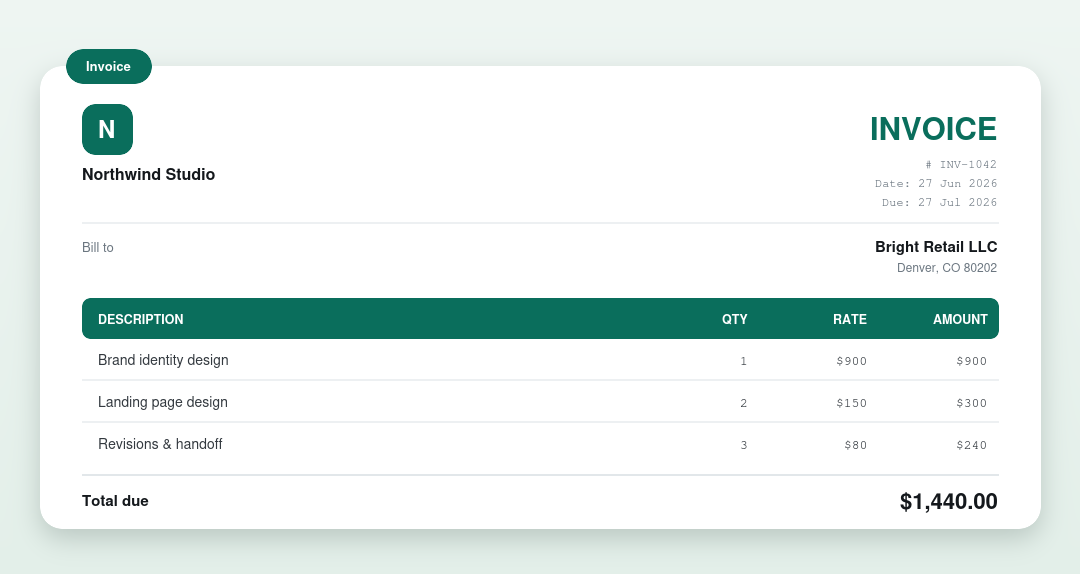
Table of Contents
How to create invoices online free
If you want to learn how to create invoices fast, start here: type in your business details, the client, and the line items. The generator adds up quantities, tax, and totals, then gives you a clean PDF to download. It works on phones, tablets, and desktops. No signup, no watermark, no limits.
What every invoice must include
Before you learn how to create invoices, know what one must include. At a minimum, a valid invoice needs the seller and buyer details, a unique invoice number, the issue and due dates, an itemised list of what was supplied, and the total due. Missing any of these is the most common reason an invoice gets queried or paid late.
| Section | What to put |
|---|---|
| The word “Invoice” | Plus a unique, sequential number (INV-0001) |
| Business & client | Your name, address and tax number, and the client’s legal name and billing address |
| Dates | The invoice date and a clear payment due date |
| Line items | A description, quantity and unit price for each product or service |
| Totals | Subtotal, any tax or discount, and the grand total due |
| Payment details | Accepted methods and your bank or payment link |
| Notes & terms | Payment terms, any late-payment policy, and a short thank-you |
How to create invoices in 7 steps
Follow these in order to learn how to create invoices the right way. Each step builds on the last, and skipping one is how invoices end up unpaid or disputed.
- Add your business details. Put your business name, address, email, and phone at the top. Add your logo if you have one. The client must know exactly who is billing them, and accounts departments reject invoices from unrecognized senders.
- Add the client details. Write the full name or company name plus the billing address. Use the legal name you have on file. A nickname or a slightly wrong company name is one of the most common reasons invoices bounce back.
- Give the invoice a unique number. Never reuse a number. A simple sequence like INV-2026-001 works for most businesses. Keep one sequence for the whole business rather than one per client, so every invoice is easy to find later. Some countries require invoice numbers to run in an unbroken sequence for tax purposes.
- Add the issue date and the due date. The issue date is the day you send the invoice. The due date comes from your payment terms, for example Net 15 or Net 30. Show both dates clearly. An invoice with no due date reads as optional, and clients treat it that way.
- List line items with quantities and rates. Give each product or service its own line with a plain description, the quantity, and the rate. The math is quantity times rate per line. Specific descriptions get approved faster than vague ones: “Logo design, three concepts” beats “Design work.”
- Add tax, discounts, and the total. Show the subtotal first, then the tax amount and rate if you charge tax, minus any discount, then the total due on its own line. Each figure on its own line lets the client follow the math without asking questions.
- State how to pay, then send it. List every payment method you accept with the details needed to use it: bank account, payment link, or mailing address. Send the finished invoice as a PDF to the person who approves payments, not just your day-to-day contact. A PDF cannot be quietly edited, which protects both sides.
Once you know how to create invoices, small firms can find more on billing practices in the U.S. Small Business Administration business guide.
What to include when you create an invoice: the essentials checklist
This is the checklist to follow when you learn how to create invoices. Run every invoice against it before sending. Missing one of these is the usual cause of a rejected or ignored invoice.
- Your business name, address, email, and phone.
- Client name and billing address, using the legal name on file.
- Unique invoice number, never reused.
- Issue date.
- Due date, set by your payment terms.
- Line items: description, quantity, rate, and line total for each.
- Subtotal of all line items.
- Tax amount and rate, if you charge tax.
- Total amount due, shown clearly.
- Payment instructions: accepted methods, account details, and terms.
Invoice payment terms compared
Part of learning how to create invoices is choosing payment terms. They set the deadline. Pick one, write it on every invoice, and apply it consistently.
| Term | What it means | Best for |
|---|---|---|
| Due on receipt | Pay as soon as the invoice arrives | Small jobs and new clients |
| Net 7 | Due 7 days after the invoice date | Fast-moving service work |
| Net 15 | Due 15 days after the invoice date | Freelancers who want quick turnaround |
| Net 30 | Due 30 days after the invoice date | The most common business standard |
| Net 60 | Due 60 days after the invoice date | Large companies with slow payables |
| 2/10 Net 30 | 2% discount if paid within 10 days, else full amount in 30 | Encouraging early payment |
| Deposit upfront | Part paid before work starts, rest on completion | Large or custom projects |
Shorter terms get you paid faster but can strain client relationships if they are unusual in your industry. Match what your clients expect, then enforce it. See Net 30 and other payment terms explained.
Ways to create invoices compared
There is no single right tool. Pick the method that fits how you work.
| Method | Strengths | Watch out for |
|---|---|---|
| Word template | Full control over layout, easy to type in | Totals do not calculate themselves |
| Excel template | Formulas add up line items and tax automatically | Formulas break if the wrong cell is edited |
| Google Docs template | Free, editable online, easy to share | Always send a PDF so the client cannot change it |
| PDF form | Print-ready and professional | Cannot be edited after saving |
| Online generator | Fastest: fill a form, download a clean PDF | Less layout control than Word |
For most freelancers learning how to create invoices, the generator wins on speed. For branded layouts with full design control, Word is the better fit.
How to number your invoices
Use a simple sequential system such as INV-0001, INV-0002, or include the year (2026-001). Never reuse a number and never skip backwards. Consistent numbering keeps your bookkeeping clean and makes any single invoice easy to find later.
Mistakes to avoid when you create invoices
When you learn how to create invoices, avoid these errors that delay payment most often:
No due date. Without one, the client decides when to pay, which usually means late. Always show the exact due date, not just “Net 30.”
Vague line items. “Consulting” or “Services” invites questions and holds up approval. Describe each line so a stranger could understand what was delivered.
Missing payment instructions. If the client has to email you to ask how to pay, you have added days to the wait. Put account details and accepted methods on the invoice itself.
Wrong client details. A misspelled company name or old address sends the invoice into an accounts black hole. Confirm the billing details before the first invoice to a new client.
Sending to the wrong person. Your day-to-day contact often cannot release payments. Ask who approves invoices and send a copy directly to them.
Maths errors. Always let the totals calculate automatically instead of doing them by hand.
No follow-up plan. If the due date passes with no payment, send a polite reminder. Have the plan before you need it.
Create one in under a minute
Rather than format an invoice by hand, use the free invoice generator: fill in the fields, watch the live preview, and download a clean PDF. Trades billing labour and materials can use the contractor invoice generator, and if you need to price a job first, send a quote. Prefer a file? Grab a free invoice template, or see a finished invoice example.
How to create invoices: FAQs
What should an invoice include?
Seller and buyer details, a unique invoice number, the invoice and due dates, itemised line items, totals with any tax, and payment details.
How long does it take to create an invoice?
With a template or generator, about five minutes once you know how to create invoices and have the details. The first one takes longer because you are setting up your business details and payment terms. After that, repeat invoices to the same client take two minutes.
Do I need special software to create invoices?
No. Anyone learning how to create invoices can start with a Word or Excel template, a Google Docs template, or a free online generator. Paid invoicing software helps when you send dozens of invoices a month and want tracking and reminders, but it is not required to start.
How should I number my invoices?
Part of learning how to create invoices is numbering them well: use one unbroken sequence for the whole business, such as INV-2026-001, INV-2026-002. Never reuse a number and avoid gaps. Sequential numbering keeps your records clean and satisfies tax record rules in many countries.
What payment terms should I use?
Net 30 is the most common standard for businesses learning how to create invoices. Freelancers often prefer Net 15 for faster cash flow. Use due on receipt for small jobs and ask for a deposit on large projects. Whatever you choose, print the exact due date on the invoice.
Can I create an invoice on my phone?
Yes. Once you know how to create invoices, the free invoice generator works in a mobile browser: fill in the form fields and download the PDF. Google Docs templates also edit well on phones.
Do I have to charge tax on an invoice?
Only if you are registered to collect it. Part of learning how to create invoices is handling tax: if you charge it, show the tax rate and amount as a separate line before the total. Check the rules where you operate.
What is the difference between an invoice and a receipt?
An invoice requests payment before it is paid; a receipt confirms payment was received after the fact. Anyone learning how to create invoices should know the difference: see our invoice vs receipt guide.
What if a client does not pay the invoice?
Send a polite reminder a few days after the due date, then follow up weekly with firmer wording. Check the invoice went to the right person. Prevention beats collection: clear terms and deposits up front.
Can I edit an invoice after sending it?
Minor corrections are fine if you reissue it with the same number marked as revised. For bigger changes, cancel the original and issue a new invoice with a new number. Never silently alter an invoice the client has already received.
How do I create an invoice for an international client?
Include both business addresses, state the currency clearly, and note who bears transfer fees. Check whether tax applies to cross-border services in your country. For goods shipped abroad, a commercial invoice with HS codes and Incoterms may be needed alongside your standard invoice.
When should payment be due?
State a clear term such as “due within 14 days” or “due on receipt” and back it with a real date so the client has a firm deadline.
How to send an invoice
Sending is the easy part once you know how to create invoices: email it as a PDF to the person who approves payments, with the invoice number in the subject line so it is easy to find. Most generators let you download the PDF straight from your phone or desktop, so you can send it within a minute of creating it.
What does an invoice look like
A standard invoice has the word “Invoice” and a unique number at the top, followed by your business details and the client’s billing details, the issue and due dates, a table of line items with quantities and rates, the subtotal, tax, total due, and payment instructions. See a finished invoice example to see the exact layout you get when you learn how to create invoices.
How to fill out an invoice
Filling out an invoice is straightforward once you know how to create invoices. Work top to bottom: your business details, the client’s legal name and billing address, a unique invoice number, and the issue and due dates. Then fill out one line per item with a description, quantity, and rate, add the subtotal, tax, and total, and finish with payment instructions. A generator does the math for you.
Related guides
- Invoice Generator: build one online in about a minute
- Invoice Template: free Word, Excel, and PDF downloads
- Quote Template: quote the job before you invoice it
- Receipt Template: confirm payment once it arrives
- How to Send an Invoice: email it right and get paid faster
Written by the FreeBillKit team. Last reviewed July 2026.