Receipt Example
Here is what a receipt looks like, with every part explained, so you know exactly what to put on yours. It’s a real, filled-in example; make your own free below.
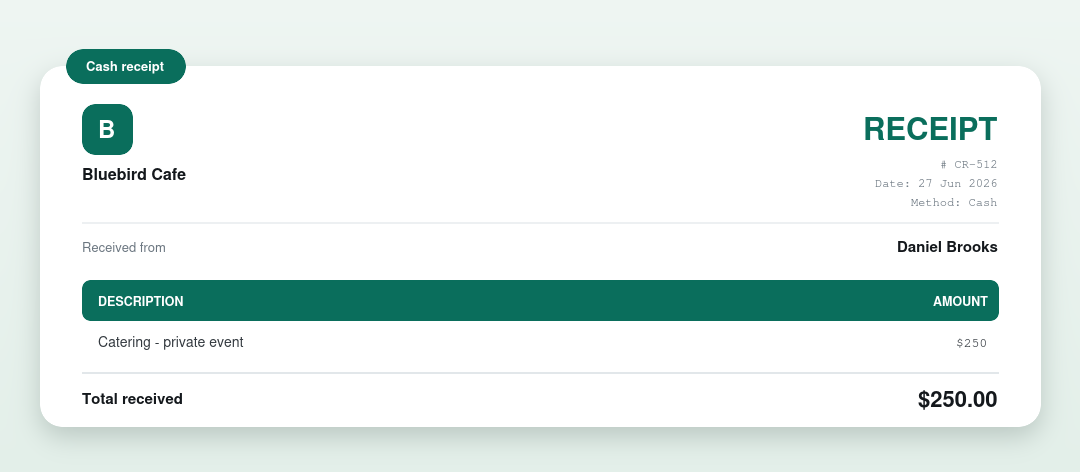
The parts of a receipt, explained
- Who issued it and who paid: the business and the payer.
- The amount received and what the payment was for.
- The date and payment method: cash, card or transfer.
- A receipt number and a signature line.
Make your own receipt free
You don’t have to build one from scratch. Our free generator fills it in and downloads a clean PDF in your browser, no signup, no watermark.
Prefer a downloadable template?
Grab a receipt template in Word, Excel or PDF from the receipt template page.
Want the full explainer? Read invoice vs receipt.
More examples
Frequently asked questions
What does a receipt look like?
A receipt shows who issued it, who paid, the amount received, what it was for, the date and payment method, as in the example above. It confirms a payment was received.
What’s the difference between a receipt and an invoice?
An invoice requests payment before it’s paid; a receipt confirms payment after. See invoice vs receipt.
Can I make a receipt like this for free?
Yes. Use our free receipt generator or download a receipt template.