Credit Note Example
Here is what a credit note looks like, with every part explained, so you know exactly what to put on yours. It’s a real, filled-in example; make your own free below.
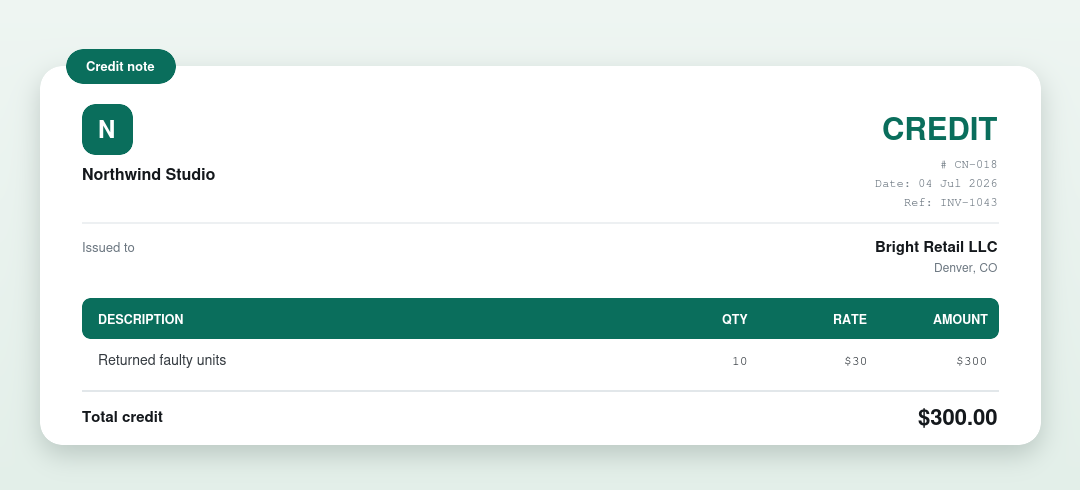
The parts of a credit note, explained
- Who issued it and who it’s for: the seller and the customer.
- A credit note number and date.
- The original invoice it’s issued against, so both sides can reconcile.
- The credited line items with quantities and amounts.
- The total credit.
- A note explaining why the credit was issued (returns, an overcharge, a discount).
Make your own credit note free
You don’t have to build one from scratch. Our free generator fills it in and downloads a clean PDF in your browser, no signup, no watermark.
Prefer a downloadable template?
Grab a credit note template in Word, Excel or PDF from the credit note template page.
Want the full explainer? Read what is a credit note.
More examples
- Invoice example
- Receipt example
- Quote example
- Purchase order example
- Rent receipt example
- Commercial invoice example
- Delivery note example
- Donation receipt example
- Proforma invoice example
- Cash receipt example
Frequently asked questions
What does a credit note look like?
A credit note shows the seller and customer, a credit note number and date, the original invoice it’s issued against, the credited items and the total credit, as in the example above. It reduces what the customer owes.
When do you issue a credit note?
When you need to reduce an already-issued invoice: for returned goods, an overcharge, or an agreed discount. The original invoice stays unchanged and the credit note adjusts the balance.
Can I make a credit note like this for free?
Yes. Use our free credit note generator or download a credit note template.